Guide: Handle HTTP Requests
This guide teaches how to create a service asset that handles HTTP requests. This is useful when you want to build a backend for a web interface.
If you have done this before and just want a quick reference, see HTTP Request Handling Reference.
Overview
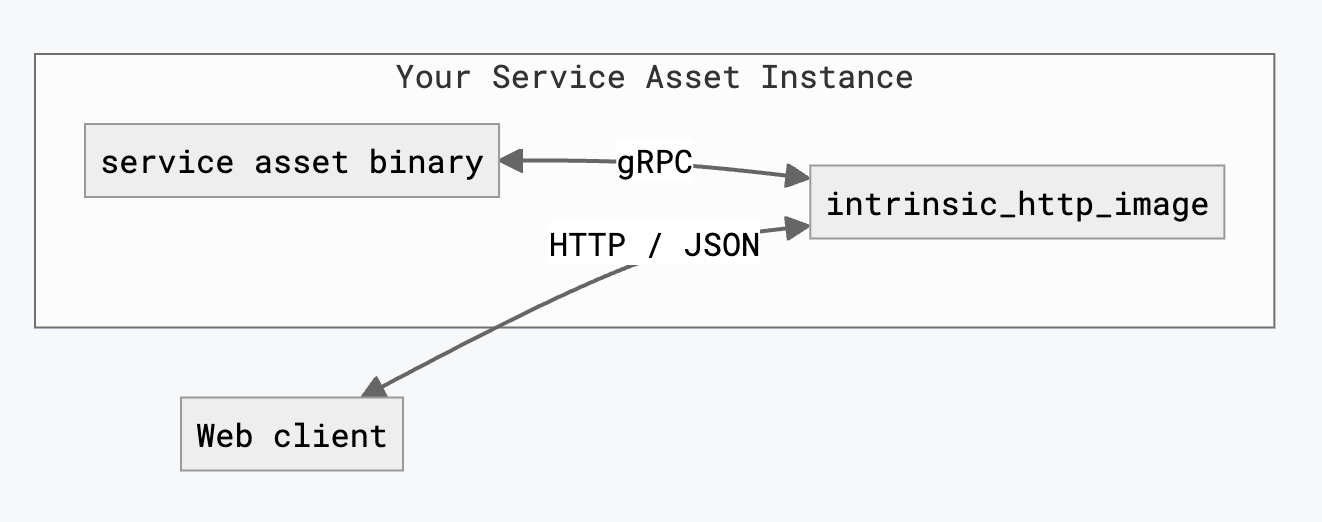
While you can make a service asset handle HTTP requests directly, we recommend you create a gRPC service first, and then use a tool to translate HTTP requests into gRPC service calls. This lets you handle communication from both web clients and other service assets with the same code.
You don't need to translate the HTTP requests yourself.
The Intrinsic SDK provides a utility intrinsic_http_image that translates HTTP/JSON requests into gRPC calls for you.
Create a new service asset
Create a new service asset in your existing Bazel workspace:
# Navigate to the root of your Bazel workspace
cd `bazel info workspace`

# Create a Python service asset
inctl service create com.example.my_backend_service --language=python --output_path guide/handle_http_requests
You now have a service asset written in Python in the guide/handle_http_requests folder.
This guide uses Python as an example, but you may create your service asset in any programming language that gRPC supports.
Add a gRPC service
You have a service asset, but it doesn't do much. You need to add a gRPC service to it.
Modify your proto definition
Add a gRPC service definition to the bottom of guide/handle_http_requests/my_backend_service.proto
message AddTwoIntsRequest {
  int32 a = 1;
  int32 b = 2;
}

message AddTwoIntsResponse {
  int32 sum = 1;
}

service AdditionService {
  rpc AddTwoInts (AddTwoIntsRequest) returns (AddTwoIntsResponse);
}
Update the BUILD file
Modify guide/handle_http_requests/BUILD to build Python code for this gRPC service.
First modify the existing load() statement to include py_grpc_library:
load("@com_github_grpc_grpc//bazel:python_rules.bzl", "py_grpc_library", "py_proto_library")
Next, add a py_grpc_library target for your service's proto file:
py_grpc_library(
    name = "my_backend_service_py_pb2_grpc",
    srcs = [":my_backend_service_proto"],
    visibility = ["//visibility:public"],
    deps = [":my_backend_service_py_pb2"],
)
Finally, make your py_binary target depend on the new Python gRPC service target by adding a dependency my_backend_service_py_pb2_grpc,
 py_binary(
     name = "my_backend_service_bin",
     # ...
     deps = [
         # ...
         # Add this line:
         ":my_backend_service_py_pb2_grpc",
         # ...
     ],
 )
Update the service manifest
Add a service_proto_prefixes entry in the service_def portion of your service manifest:
service_def {
  # Add this line:
  service_proto_prefixes: "/com.example.my_backend_service.AdditionService/"
  # ...
}
Implement the gRPC service
Modify guide/handle_http_requests/my_backend_service.py to make it implement the new gRPC service.
First, add the following Python import statements to the top of the file:
from concurrent.futures import ThreadPoolExecutor
import grpc
from guide.handle_http_requests import my_backend_service_pb2_grpc
Next, add an implementation of the gRPC class, and a convenience function to construct the gRPC server using that implementation.
class AdditionService(my_backend_service_pb2_grpc.AdditionServiceServicer):
  def AddTwoInts(self, request, context):
    sum = request.a + request.b
    return my_backend_service_pb2.AddTwoIntsResponse(sum=sum)


def make_grpc_server(port):
  server = grpc.server(
      ThreadPoolExecutor(),
      options=(('grpc.so_reuseport', 0),),
  )

  my_backend_service_pb2_grpc.add_AdditionServiceServicer_to_server(
      AdditionService(), server
  )
  added_port = server.add_insecure_port(f'[::]:{port}')
  if added_port != port:
    raise RuntimeError(f'Failed to use port {port}')
  return server
Finally, modify the run_real_service() and run_simulated_service() functions to start your gRPC server.
def run_real_service(context, config):
  logging.info(f'Hello real world: {config.text}')
  server = make_grpc_server(context.port)
  server.start()
  server.wait_for_termination()


def run_simulated_service(context, config):
  # Run the same code in simulation and on real workcells
  run_real_service(context, config)
Translate HTTP to gRPC requests
Your service asset now has a gRPC service; however, it cannot yet handle HTTP requests. To make your service asset handle HTTP requests, you must:
- Annotate your proto to define how HTTP requests map to gRPC requests
- Generate an image that does the translation using intrinsic_http_image
- Declare that your service supports HTTP requests in its manifest
Add HTTP Annotations to your proto
The google.api.Http annotations describe how to map HTTP requests to gRPC requests.
You must add a google.api.Http annotation to your gRPC service to make it reachable via HTTP.
Make the annotations available by importing google/api/annotations.proto in guide/handle_http_requests/my_backend_service.proto.
package com.example.my_backend_service;

# Add this line:
import "google/api/annotations.proto";
To make an HTTP handler at the endpoint /v0/addition:add, add the following annotation to the AddTwoInts definition:
  rpc AddTwoInts(AddTwoIntsRequest) returns (AddTwoIntsResponse) {
    option (google.api.http) = {
      post: "/v0/addition:add"
      body: "*"
    };
  }
In guide/handle_http_requests/BUILD add a new dependency on @com_google_googleapis//google/api:annotations_proto to the my_backend_service_proto proto_library target.
proto_library(
    name = "my_backend_service_proto",
    # ...
    # Add this line:
    deps = ["@com_google_googleapis//google/api:annotations_proto"],
)
For more details on how to annotate gRPC services, see HTTP Request Handling Reference.
Add Golang support to your proto
You must set up a Golang toolchain in your MODULE.bazel and add Golang support to your proto definition.
If you do not already have a Golang toolchain, add the following lines to the end of your MODULE.bazel:
# Golang toolchain
go_sdk = use_extension("@io_bazel_rules_go//go:extensions.bzl", "go_sdk")
go_sdk.download(version = "1.25.0")

bazel_dep(name = "gazelle", version = "0.47.0", repo_name = "bazel_gazelle")

go_deps = use_extension("@bazel_gazelle//:extensions.bzl", "go_deps")
go_deps.module(
    path = "google.golang.org/genproto/googleapis/api",
    version = "v0.0.0-20250929231259-57b25ae835d4",
    sum = "h1:8XJ4pajGwOlasW+L13MnEGA8W4115jJySQtVfS2/IBU=",
)
use_repo(
    go_deps,
    "org_golang_google_genproto_googleapis_api",
)
Add Golang support to your service by adding option go_package to guide/handle_http_requests/my_backend_service.proto:
option go_package = "guides/handle_http_requests/my_backend_service_go_proto";
Add a new load() statement to the top of guide/handle_http_requests/BUILD:
load("@io_bazel_rules_go//proto:def.bzl", "go_proto_library")
Finish adding Golang support to your service by adding a go_proto_library target to your BUILD file:
go_proto_library(
    name = "my_backend_service_go_proto",
    compilers = [
        "@ai_intrinsic_sdks//bazel:go_gen_grpc_gateway",
        "@io_bazel_rules_go//proto:go_grpc_v2",
        "@io_bazel_rules_go//proto:go_proto",
    ],
    importpath = "guides/handle_http_requests/my_backend_service_go_proto",
    protos = [":my_backend_service_proto"],
    deps = [
        "@org_golang_google_genproto_googleapis_api//annotations",
    ],
)
Use intrinsic_http_image
The Intrinsic SDK provides a Bazel macro, intrinsic_http_image, which automatically translates HTTP requests to gRPC calls.
To use this, first load the macro in guide/handle_http_requests/BUILD:
load("@ai_intrinsic_sdks//intrinsic/httpjson:intrinsic_http_image.bzl", "intrinsic_http_image")
Add an intrinsic_http_image target using targets and information about your service:
intrinsic_http_image(
    name = "my_backend_service_http_image",
    go_proto = ":my_backend_service_go_proto",
    grpc_service = "com.example.my_backend_service.AdditionService",
    proto = ":my_backend_service_proto",
)
Add the image to your existing intrinsic_service target:
intrinsic_service(
    name = "my_backend_service_service",
    # ...
    images = [
      # Add this line:
        ":my_backend_service_http_image.tar",
        # ...
    ],
    # ...
)
You must declare the image in your service manifest.
Add extra_images to the real_spec and sim_spec sections in guide/handle_http_requests/my_backend_service_manifest.textproto:
service_def {
  # ...
  real_spec {
    # ...
    # Add these 3 lines:
    extra_images {
      archive_filename: "my_backend_service_http_image.tar"
    }
  }
  sim_spec {
    # ...
    # Add these 3 lines:
    extra_images {
      archive_filename: "my_backend_service_http_image.tar"
    }
  }
}
Declare support for HTTP requests
The Intrinsic Platform only routes HTTP requests to services that declare they can handle them.
Add http_config: {} to your service manifest to declare that it can handle HTTP requests:
service_def {
  # Add this line:
  http_config: {}
  # ...
}
Try your new HTTP API
Your service is now ready to handle HTTP requests. First, build your service with:
bazel build //guide/handle_http_requests/...
Start a Solution on a local workcell, and set some environment variables in your terminal:
INTRINSIC_ORGANIZATION=your@org
CLUSTER=vmp-123-abcdefgh
BUNDLE=`bazel info workspace`/`bazel cquery --output=files //guide/handle_http_requests:my_backend_service_service`
Install your service asset, and add an instance of it named "backend" to your Solution.
inctl asset install --org $INTRINSIC_ORGANIZATION --cluster $CLUSTER $BUNDLE
inctl service add --org $INTRINSIC_ORGANIZATION --cluster $CLUSTER com.example.my_backend_service --name backend
On local workcells, access your service instance named "backend" at the following base URL:
http://intrinsic.local/ext/services/backend
Send a request to the /v0/addition:add endpoint using curl.
curl -X POST "http://intrinsic.local/ext/services/backend/v0/addition:add" -H "Content-Type: application/json" -d '{
    "a": 5,
    "b": 10
  }'
The intrinsic_http_image macro also provides an OpenAPI specification at the endpoint /openapi.yaml.
Download it using curl:
curl "http://intrinsic.local/ext/services/backend/openapi.yaml"
Congratulations! You have created a service asset that can handle HTTP requests.