Choose camera hardware
Your camera hardware setup determines the accuracy and flexibility of pose estimation in your solution.
How many cameras to use
Flowstate supports pose estimation for both single camera, as well as multiple camera setups. Please refer to the documentation on the different pose estimation methods for more information on which algorithm to use for which case.
| Use a single camera, when | Use multiple cameras, when |
|---|---|
| - fast inference and low cost is needed. - the camera is mounted on the robot arm. - your application tolerates lower pose estimation accuracy along the camera's optical axis. - the camera is placed close to the object (seeing at least 50x50 pixels per object). | - high(-er) pose estimation accuracy is needed. - robustness against occlusions is needed. - detecting small objects with large object-camera distances. - detecting small objects in clutter. |
Choose a camera sensor resolution
Using a higher-resolution camera improves the accuracy of pose estimation in your solution at a cost to speed during inference. A resolution of 2.3 MPixel with an 8mm or 12.5mm lens often works well.
All cameras within a multi-view setup for pose estimation must have the same sensor resolution and lens type.
Choose the way you connect your camera(s)
If you have only low resolution (2 Mpixel) cameras that you don't need to access simultaneously you can just connect them to the network interface your IPC uses as uplink.
When using multiple cameras, especially when they have a resolution higher than 2 megapixels, we highly recommend you set them up with a separate 10 Gbit/s network interface on your IPC.
Choose a lens
This is only relevant for cameras with removable lenses.
For some RGB cameras, you can change the lens of the camera which changes the field of view of your camera:
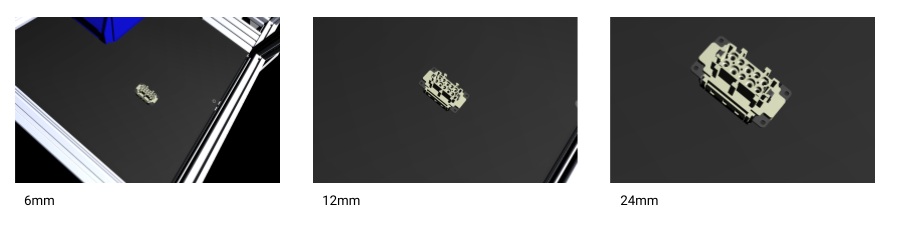
For optimal pose estimation accuracy, maximize the object size in the image (measured in pixels) while covering the entire region of interest. To choose a lens, determine the smallest allowable field of view (FOV) depending on your region of interest and then select the lens with the corresponding focal length.
Accuracy versus flexibility
Flexibility and accuracy have a reciprocal relationship. For example, having a wide-angle lens provides a view of a larger working volume, allowing for a bigger variety in object poses, but since fewer pixel cover the area of the object, accuracy will drop correspondingly. In order to increase pose accuracy, you can either use a higher resolution camera at the cost of runtime speed, or choose a higher focal length. Using a lens with higher focal length to zoom in on the working volume increases the detection accuracy as more details of the object are seen, but it decreases the flexibility of object poses that the camera can detect:
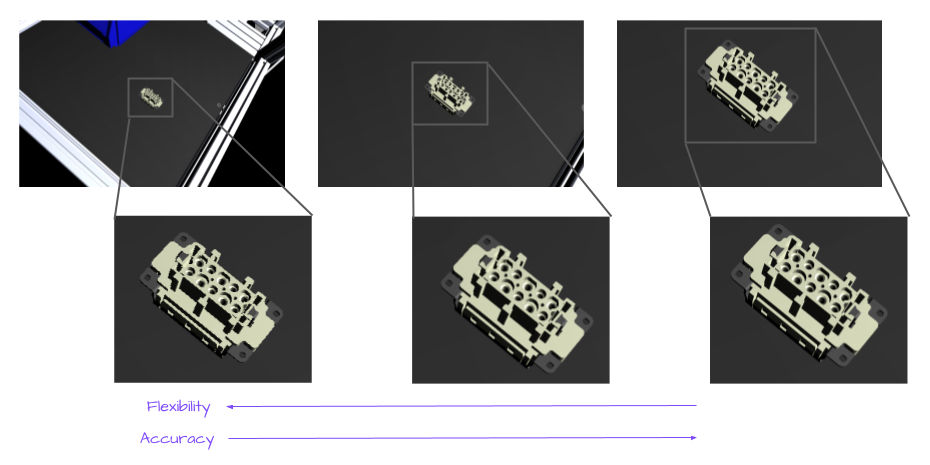
Adjust both accuracy and flexibility according to the needs of your working volume.