Add a Python script
In Flowstate, skills and control nodes are the building blocks for creating powerful automated processes. To enhance flexibility and customization, Flowstate offers the "Python script" node. This node empowers you to seamlessly integrate custom Python code directly into your workflows.
With the integrated code editor, you can easily write a Python code snippet to perform calculations or manipulate input data, create arbitrary output data and add logic between your existing nodes – all without leaving the Flowstate interface.
Node configuration
Begin by adding the "Python script" node to your process from the Add process button.
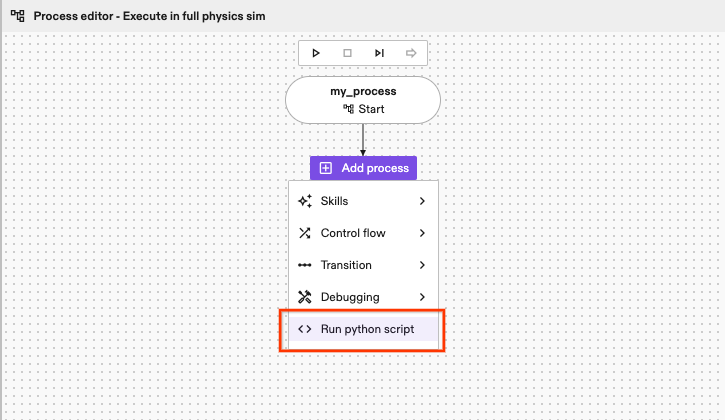
Add a Python script node to the process
Once added, the Details panel of the node provides general information about the node type and more specific information about this node instance such as the unique name and the return value key. This key will contain the outputs generated by this node instance.
It also has two additional panels, the Inputs and Output, respectively. These panels allow you to fully customize inputs and outputs of the node. We support various data types, from primitive types (bool, int32, double, etc) to more specialized data types.
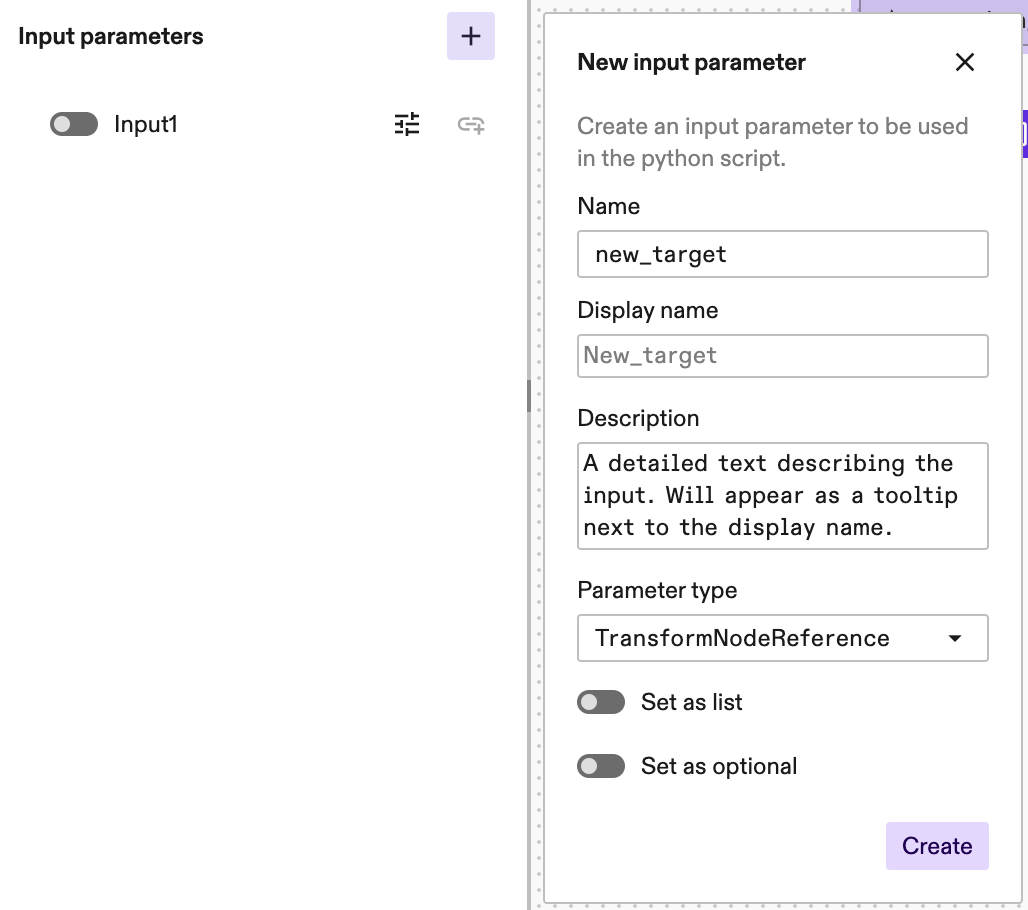
Example of how to create an input parameter
The inputs and output generated can be used in the data flow of the process. Please refer to the article on data flow between skills.
Code editing features and Python language support
The code editor for the node can be opened by clicking Open code window in the side panel. In addition to basic Python support like syntax highlighting, autocompletion and autoindenting, the code editor provides the additional features and shortcuts from which the most relevant are:
Mod usually refers to the Ctrl key in mosts systems and Cmd in macOs.
- Search and replace (
Mod-F) - Copy, cut and paste (
Mod-C,Mod-X,Mod-P) - Undo (
Mod-Z) and redo (Mod-YorMod-Shift-Z) - Undo selection (
Mod-U) and redo selection (Mod-Shift-U) - Fold code (
Mod-Shift-[) and unfold code (Mod-Shift-]) - Fold all (
Mod-Alt-[) and unfold all (Mod-Alt-])
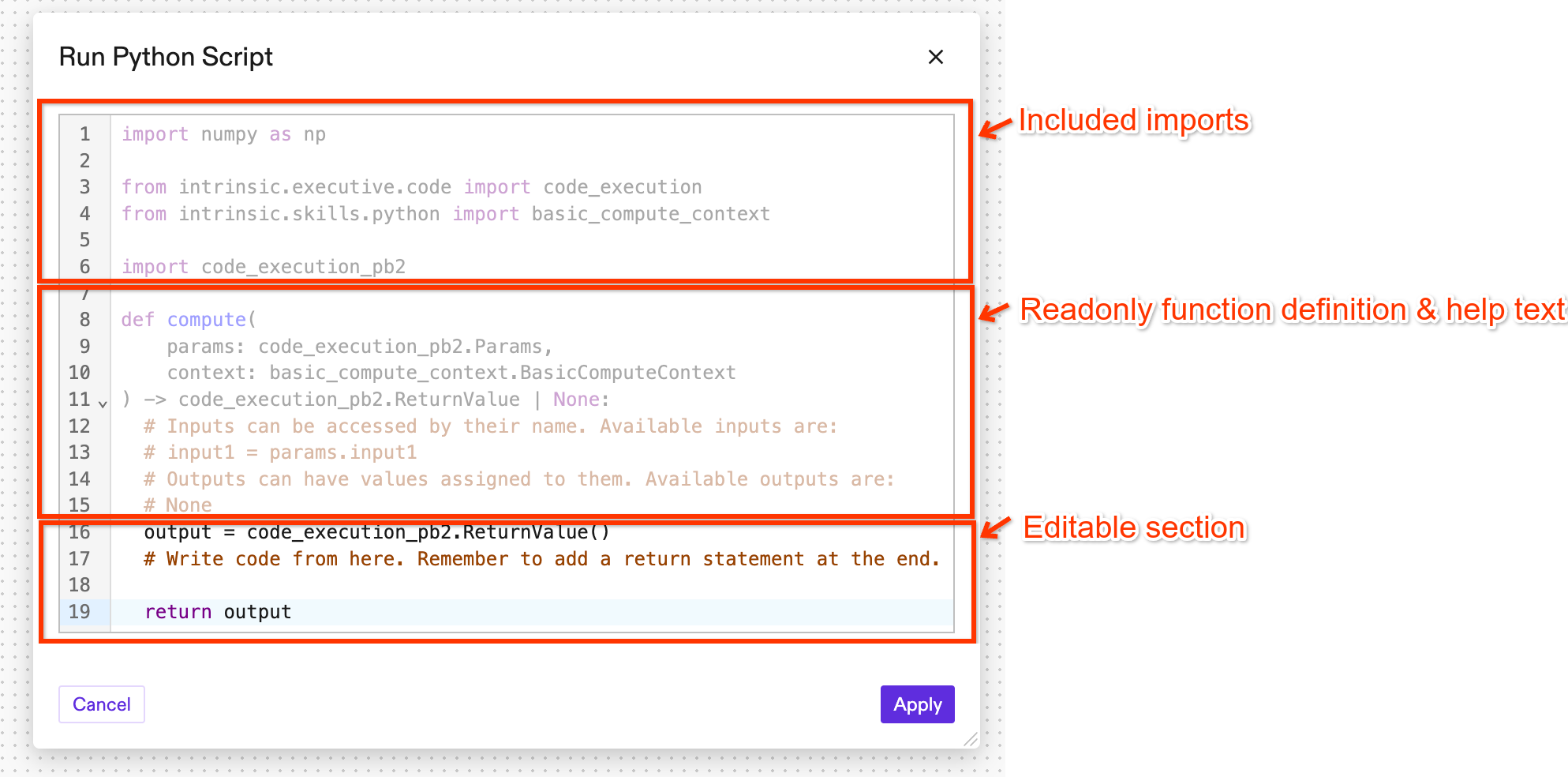
Code window
The autocompletion suggestions are primarily populated from a semi-static list of globals and tokens of the Python language syntax with additional locally defined variables. Autocompletion for external libraries as well as Intrinsic libraries is not supported.
Changes made within the editor are not automatically saved while the editor is open. Please remember to regularly save your progress by clicking the Apply button.
Usable Python packages
For reasons of simplicity and performance the number of supported packages is limited. For more advanced implementations writing a full Python skill may be a better option (see "Develop a skill").
Please reach out to Intrinsic support in case you are missing an explicit package or functionality in the "run python script" node.
The following packages can be used in the code of a "run python script" node:
- The Python3 standard library (link)
- The
numpypackage (link) - Intrinsic specific Python packages from the Intrinsic SDK:
intrinsic.geometry.proto.*(SDK)intrinsic.geometry.service.*(SDK)intrinsic.icon.equipment.*(SDK)intrinsic.icon.proto.*(SDK)intrinsic.kinematics.types.*(SDK)intrinsic.math.proto.*(SDK)intrinsic.math.python.*(SDK)intrinsic.resources.proto.*(SDK)intrinsic.scene.product.proto.*(SDK)intrinsic.scene.proto.*(SDK)intrinsic.skills.proto.*(SDK)intrinsic.util.grpc.error_handling(SDK)intrinsic.world.proto.*(SDK)intrinsic.world.python.*(SDK)intrinsic.world.robot_payload.python.*(SDK)
Code execution and failure propagation
The Python code contained within the node is executed during the runtime of the process. In the event of any errors encountered within the Python script, the node will fail and create an ExtendedStatus report. The error message typically includes the Python-specific error message aiding in the debugging and troubleshooting process.
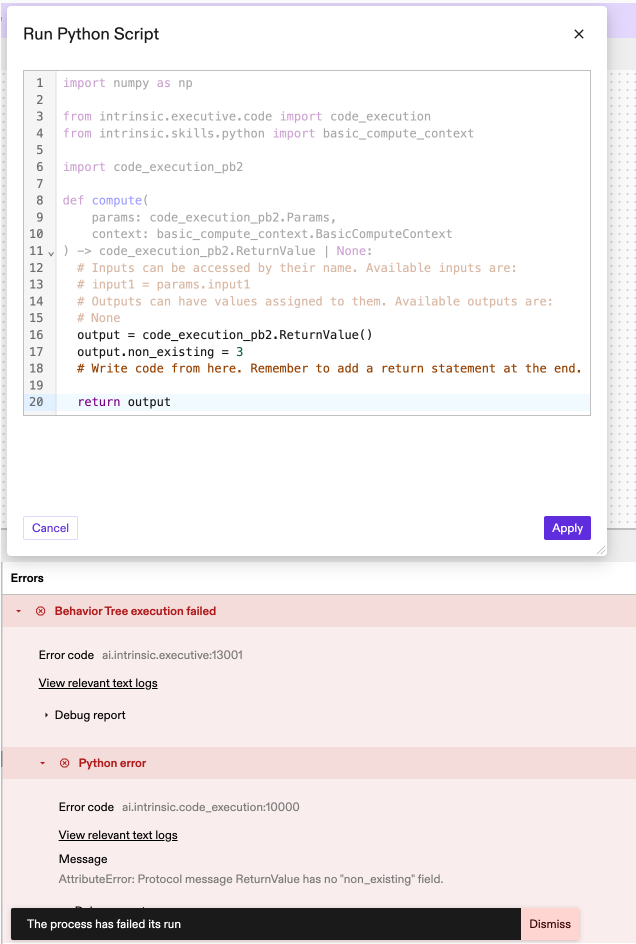
Failure message propagation
It is currently not possible to view any print output that the Python code may create.
During development, it can be helpful to add a second "Python script" node after the one under development. This way, the outputs of the first "Python script" node can be fed to the second one. This can be achieved by defining a data flow between the two nodes. After execution, the second node will display the value generated by the first one in a human readable format.
Python linting is not supported within the editor.
Code examples
To illustrate the practical application of the "Python script" node, here are a few examples of Python code that can be implemented within the node:
These examples can be copied and pasted directly into the code window in Flowstate.
-
Generate a random number to use in other skill inputs
In this example we will create a random number between 1 and 10 with a discrete uniform distribution. That number will be assigned to an output of the Python script node. For this example, create an integer output with the name
int_out.output = code_execution_pb2.ReturnValue()
output.int_out = np.random.randint(1, 10)
return output -
Convert input data to another data type
In this example we will transform an integer input into a float output. For this example, create an integer input with the name
int_inand a float outputfloat_out.output = code_execution_pb2.ReturnValue()
output.float_out = float(params.int_in)
return output -
Transform a pose with a 90 degrees rotation around the X-axis
You can also perform more complex computations such as a pose rotation. The code rotates the input pose by 90 degrees around the X-axis. For this example, create a Pose input
pose_inand a Pose outputpose_out.from intrinsic.math.python import data_types
from intrinsic.math.python import proto_conversion
pose1 = proto_conversion.pose_from_proto(params.pose_in)
rotation = data_types.Pose3(rotation=data_types.Rotation3.from_euler_angles(rpy_degrees=[90, 0, 0]))
rotated_pose = pose1 * rotation
output = code_execution_pb2.ReturnValue()
output.pose_out.CopyFrom(proto_conversion.pose_to_proto(rotated_pose))
return output -
Move an object to a random position
The world is exposed via
context.object_world, so it is possible to, for example, move objects in the world. This script moves an object to a random position within a region defined by two floating point offsetsdxanddy. In addition todxanddy, there are two more inputs: AFrameRefrenceByNamenamedframeand anObjectReferencenamedobject.from intrinsic.world.proto import object_world_refs_pb2
from intrinsic.math.python import pose3
import random
world = context.object_world
# First get the object, frame and the current position of the frame from the world.
object = world.get_object(params.object)
frame = world.get_frame(object_world_refs_pb2.FrameReference(by_name=params.frame))
frame_pos = world.get_transform(world.root, frame)
# Compute a new pose randomly offset from out frame's pose.
dx = random.uniform(-params.dx, params.dx)
dy = random.uniform(-params.dy, params.dy)
new_pos = pose3.Pose3(rotation=frame_pos.rotation,
translation=[frame_pos.translation[0] + dx,
frame_pos.translation[1] + dy,
frame_pos.translation[2]])
# Move object to new_pos.
world.update_transform(world.root, object, new_pos)
output = code_execution_pb2.ReturnValue()
return output -
Create a grid pattern of frames
The world can also be used to create new frames. In this example, a pattern of
n_xbyn_yframes is created. As above it takes a referenceframeas aFrameRefrenceByNameand additionally astringprefixfor the names of the new frames and afloatdeltathat defines how far apart the frames should be.from intrinsic.world.proto import object_world_refs_pb2
from intrinsic.math.python import pose3
# Get position of reference frame.
world = context.object_world
frame = world.get_frame(object_world_refs_pb2.FrameReference(by_name=params.frame))
frame_pos = world.get_transform(world.root, frame)
# Create a pattern of frames
for i_x in range(params.n_x):
for i_y in range(params.n_y):
frame_name = f"{params.prefix}_{i_x}_{i_y}"
dx = i_x * params.delta
dy = i_y * params.delta
new_pos = pose3.Pose3(rotation=frame_pos.rotation,
translation=[frame_pos.translation[0] + dx,
frame_pos.translation[1] + dy,
frame_pos.translation[2]])
context.object_world.create_frame(frame_name, world.root, new_pos)
output = code_execution_pb2.ReturnValue()
return output -
Create and return a circular pattern of frames
The Python script can also return references to the created frames. These can then be directly iterated over in a loop node. In this example, a circular pattern with a
floatradiusovernsteps is created. It again takes astringprefixfor the created frames and a referenceframeas aFrameRefrenceByName. In addition it defines an outputcreated_framesof typeTransformNodeReferencethat is set as a list.from intrinsic.world.proto import object_world_refs_pb2
from intrinsic.math.python import pose3
import math
world = context.object_world
frame = world.get_frame(object_world_refs_pb2.FrameReference(by_name=params.frame))
frame_pos = world.get_transform(world.root, frame)
# Deleted frames created by previous steps
for world_object_name in dir(world):
if not world_object_name.startswith(params.prefix):
continue
old_frame = world.get_frame(object_world_refs_pb2.FrameReference(by_name=object_world_refs_pb2.FrameReferenceByName(frame_name=world_object_name, object_name="root")))
context.object_world.delete_frame(old_frame)
output = code_execution_pb2.ReturnValue()
# Create `n` frames in a circular pattern with `radius`.
for i in range(params.n):
frame_name = f"{params.prefix}_{i}"
dth = i/params.n * 2 * math.pi
dx = params.radius * math.cos(dth)
dy = params.radius * math.sin(dth)
new_pos = pose3.Pose3(rotation=frame_pos.rotation,
translation=[frame_pos.translation[0] + dx,
frame_pos.translation[1] + dy,
frame_pos.translation[2]])
new_frame = context.object_world.create_frame(frame_name, world.root, new_pos)
# Add a reference to the created frame to the output.
output.created_frames.append(new_frame.transform_node_reference)
return output