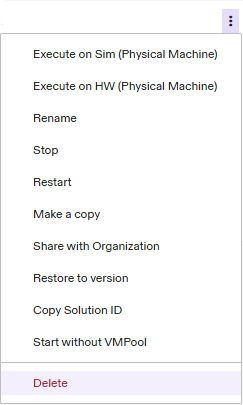
Delete a Solution
Solutions can be deleted from the Portal. To delete a Solution:
- Locate the Solution you want to delete in the Solutions table in the Portal, either on the Home tab or on the Solutions tab.
- Click the three-dot menu to the right of the Solution and select “Delete”.
- A confirmation dialog will appear. Click the “Delete” button to delete your Solution. If your Solution is currently running, this action will first stop your Solution, then delete it.
- If the deletion is successful, you'll see a confirmation toast at the bottom of your screen.
Note that this deletes the entire Solution, including its entire version history. If you have accidentally deleted an important Solution, reach out to Customer Support for assistance.