estimate_point_cloud
Skill class for ai.intrinsic.estimate_point_cloud skill.
Skill class for ai.intrinsic.estimate_point_cloud skill.
The estimate_point_cloud skill estimates the 3D point cloud of a scene using
observations from at least two cameras. We recommend using the Intrinsic
Plenoptic System (IPS) cameras for improved reconstruction.
The goal of this skill is to dynamically reconstruct the scene in case the digital twin does not accurately represent the real world scene.The skill also features collision avoidance with objects that are either misrepresented or entirely missing from the simulated environment.
The skill uses input images and user-defined stereo pairs to compute the scene's 3D reconstruction.
Prerequisites
Required inputs:
-
capture_data : This parameter must be linked to the output of the
capture_imagesskill. This provides image data for each camera that is intended to be used for point cloud estimation. -
stereo_pair_ids : A list of stereo pairs required for point cloud estimation. Each pair is defined by two cameras, where each camera specifies a camera slot id (integer value) and an optional sensor_id (integer value). The camera_slot_id refers to the ID of the camera provided via
capture_dataparameter, while the sensor_id indicates which specific sensor of that camera to use. For single*sensor cameras (e.g., Basler), the sensor_id can be omitted. For IPS cameras the sensor_ids are defined as follows:- sensor_id 1: RGB camera
- sensor_id 2: Polarized camera
- sensor_id 3: Polarized camera
- sensor_id 4: Infra-red camera
-
point_cloud_service_name : the name of the service to be used for point cloud estimation. It has to be an existing service in the solution. Based on this, the algorithm will be automatically chosen. Available services for point cloud estimation can be selected from the Service Catalog.
-
Min Depth and Max Depth define the depth range of the scene. The cameras must be extrinsically calibrated w.r.t each other. This means that, if the solution is running in real world, the relative position and orientation of the cameras should match (up to the calibration accuracy) the real world position. Follow camera-to-camera calibration process for more information on how to calibrate multiple cameras.
Usage Example
We recommend using a three-camera configuration with horizontal alignment (refer to the image below for an example setup). The primary advantage of this setup is that it provides the model with multiple, distinct baselines (the physical distance between the optical centers of any two cameras). Each baseline supplies a different type of signal that helps the algorithm estimate the point cloud more accurately across the entire depth range - from objects very close to the cameras (small baseline signal) to objects far away (large baseline signal). We recommend using the large baseline as the first value of the list in stereo_pair_ids parameter.
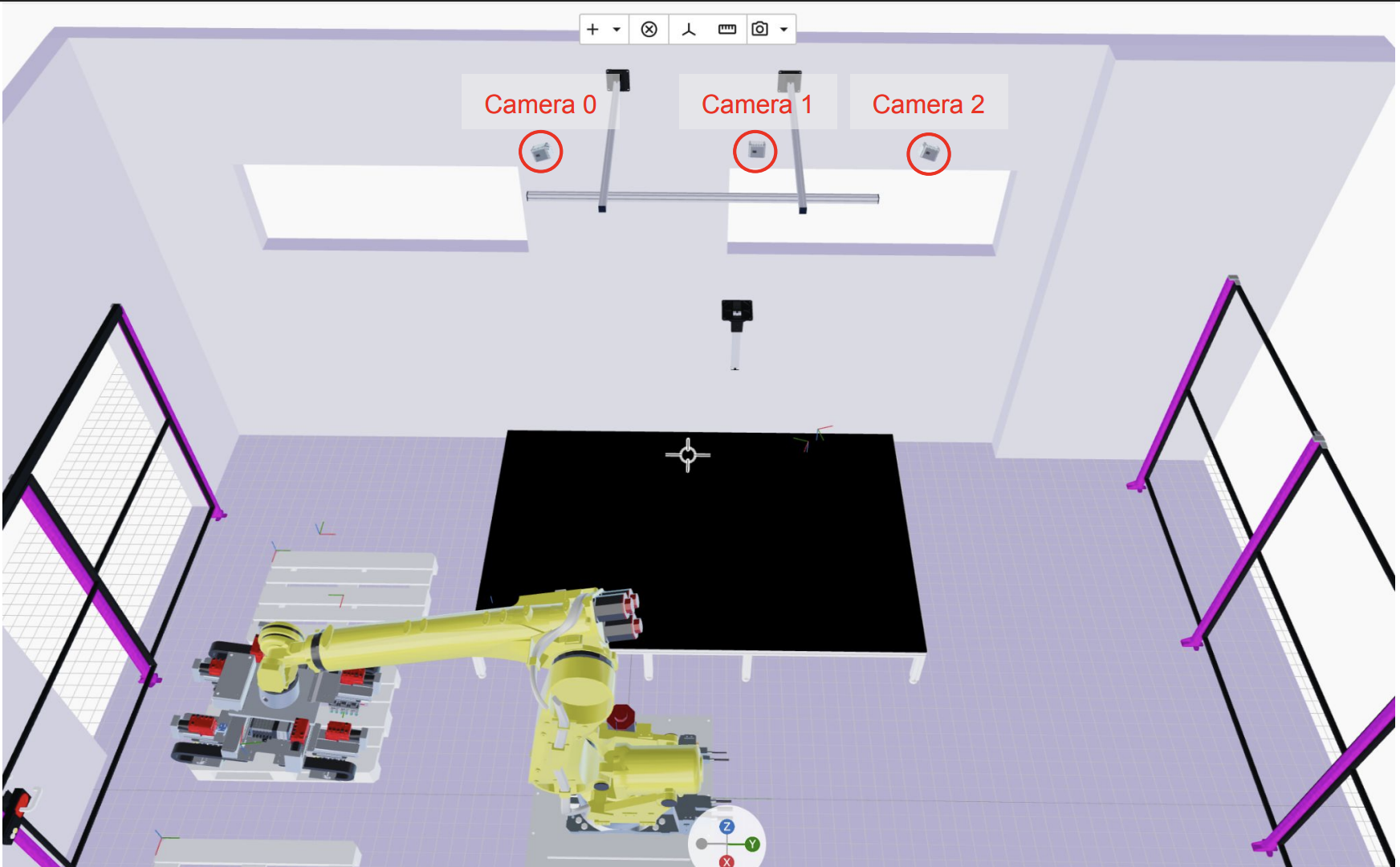
Follow these steps below to correctly set up the estimate_point_cloud skill:
- Add
capture_imagesskill for each camera you want to use for the point cloud estimation. The Behavior Tree for a case with three cameras should be similar to the one shown in the image below.
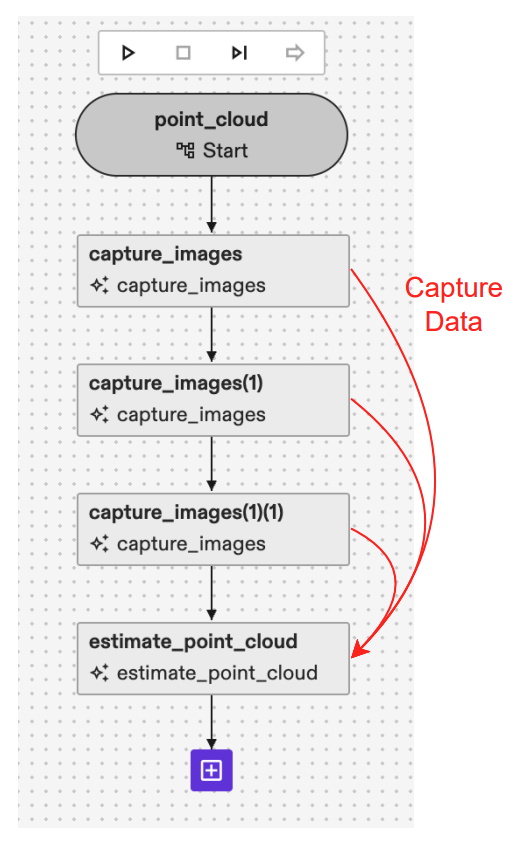
- Link the CaptureData output of different
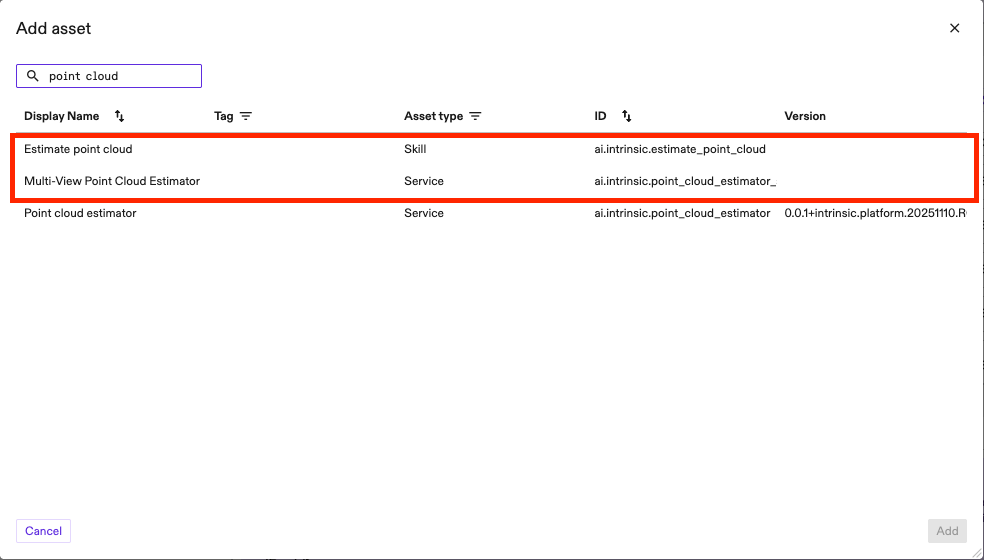
capture_imagesskills to the list ofCaptureDatainestimate_point_cloudas shown in the image above. - Add one of the point cloud estimation services available from the catalog: Multi View Point Cloud Estimator (for higher point cloud accuracy despite slower runtime) or Point Cloud Estimator (for faster runtime with a trade off in accuracy). Give an arbitrary name to the service. We recommend using Multi View Point Cloud Estimator as the one in the image below.
- Define stereo_pair_ids used for inference. A stereo pair is by definition a set of two images (first and second image) looking at the same scene from different viewpoints. You can define multiple stereo_pairs as the parameter is a repeated field. Generally, providing more stereo pairs will lead to a more robust and accurate point cloud estimation because you are passing more information to the model. However, you must consider that an increased number of pairs will directly consume more GPU memory and will result in a slower inference time. For the previously recommended three camera linear configuration (e.g., Camera 0, Camera 1, and Camera 2), we strongly recommend defining three stereo pairs to fully exploit the different baselines:
- Large Baseline Pair: The first stereo pair should be composed of the two cameras that are furthest apart (e.g., Camera 0 and Camera 2). This large baseline provides the best signal for estimating areas that are further away from the camera, as triangulation error will be lower with a larger cameras displacement.
- Small Baseline Pairs: The other two stereo pairs should be composed of the two closer, adjacent cameras (e.g., Camera 0 and Camera 1, and Camera 1 and Camera 2). These small baselines are ideal for estimating areas that are closer to the camera as the occlusion given by the viewpoint shift will be smaller.
You can define the stereo_pair by:
-
Camera_slot: indicate the image by the slot of the capture_data parameter above. If you have three capture_data added in step 1 this value will be 0, 1 or 2. -
Sensor_id: in case of single-sensor cameras you can keep this value unset (default is 0) but if you are using a multi-sensor cameras, like an IPS camera, you need to define the right sensor_id you want to use. IPS units have 4 sensors (e.g. sensor_id 1, 2 and 3 are RGB sensor, sensor_id 4 is IR sensor). In the example below (with IPS cameras) we have a total of 4 stereo_pairs, and the first one is defined by (camera_0-sensor_1) - (camera_2-sensor_1)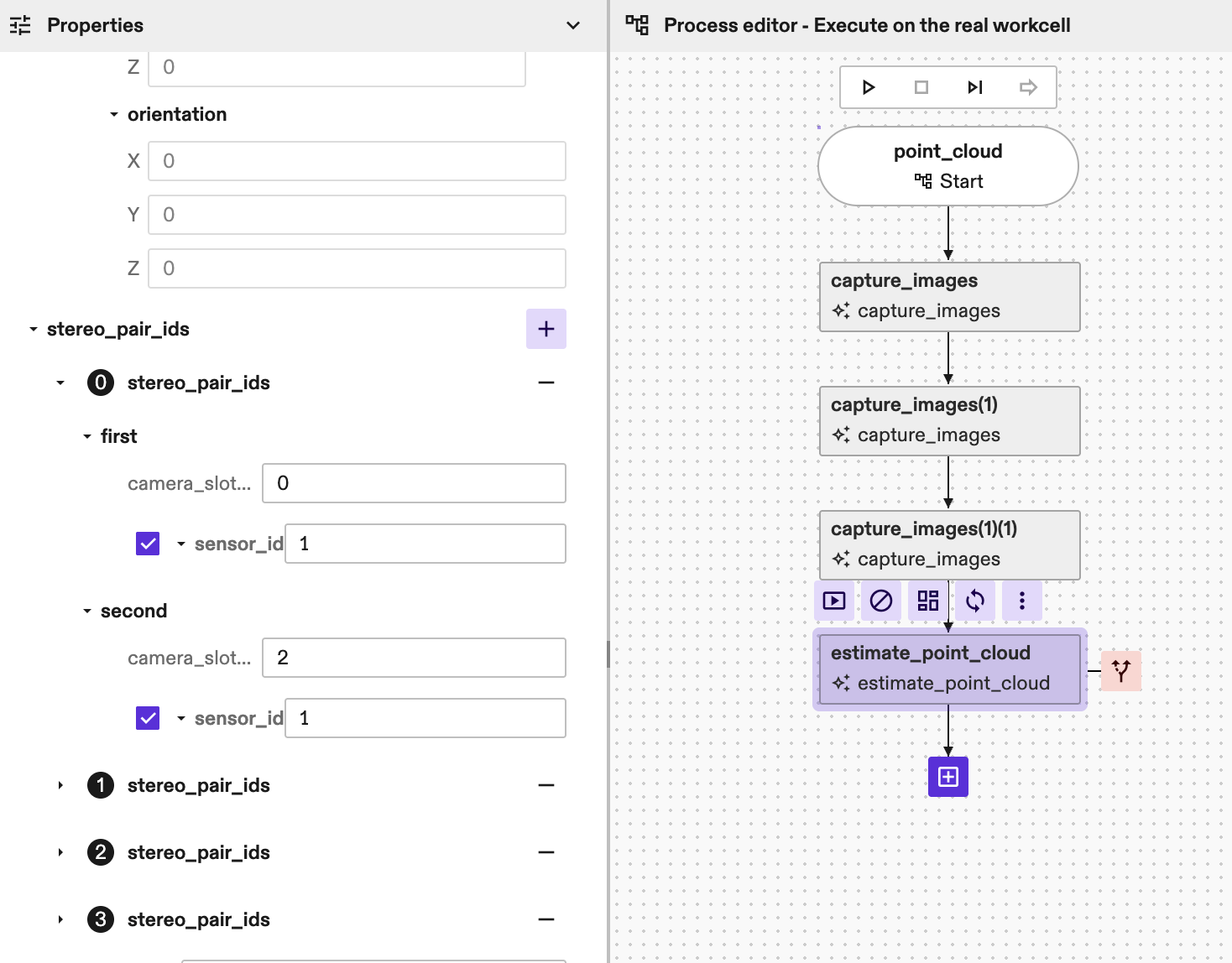
-
Add the name to the point_cloud_service_name parameter of the
estimate_point_cloudskill.
(Optional parameters):
image_scaledefine the scale of the images to run the algorithm. Should be in the range [0, 1]. A lower scale results in a faster estimation but can degrade point cloud accuracy. The default value is 1.0. If multiple values are passed, the algorithm will run inference multiple times iteratively to refine the results. Such a multiscale approach improves results for applications with large camerato*object distance (>2.5m), but most applications will not need it: we recommend using the default value or, generally, only one value for image scale.point_cloud_renderingcontains additional parameters to optionally add the point cloud to the world. The point cloud in the world can then be used for visualization and/or collision avoidance. Mind that, for better runtime, the point cloud is downscaled by a factor of 3 before adding it to the world, so we recommend to use the skill's return value for denser depth information. Acollision_marginparameter can also be set here to add margins to the point cloud to account for small inaccuracies of the reconstruction during path planning. Default value forcollision_marginis 0.005m if not set.return_paramscontains additional parameters to optionally add return values to the skill (e.g point_cloud proto or image 3d).disparity_search_steps. This is a list of steps that should match the number of image scales above. We recommend leaving this empty as the default value will provide good results for the vast majority of applications. If more than one image scale is passed, then this value should be filled by the user. For two image scales we recommend setting disparity_search_steps to [2, 1] to allow finer search in the second inference run.debug_paramscontains additional parameters to help in debug purposes. Setting this parameter logs additional debug data, which can be used by our support team to reproduce the results.
Parameters
capture_data
If specified, the skill uses the capture_result_locations within to
retrieve images captured earlier.
If not specified, the skill captures new images directly from the cameras.
stereo_pair_ids
Specifies the camera handle names that constitute each stereo pair. At least one stereo pair must be specified. If more than one stereo pair is specified, the first one will be assumed to be the reference pair.
point_cloud_service_name
Name of the point cloud service to be used for point cloud inference. First make sure the service is available in the cluster or add it through the Services Dialog.
min_depth
Minimum depth of the working volume expressed with respect to the would-be rectified reference view pair, in meters.
max_depth
Maximum depth of the working volume expressed with respect to the would-be rectified reference view pair, in meters.
point_cloud_rendering
Settings to add point cloud to the world. This section provides parameters to add the estimated point cloud to the world and the possibility to select collision margins for it.
image_scales
How to scale the input images, where image scale should be in the range [0, 1]. The smaller the scale, the faster the algorithm can run, but the accuracy could be lower. For example, for scale 0.5 all images would be downsampled by a factor of 2 (in both dimensions). If multiple image scales are provided, multiple inferences runs are executed, each with a different image scale. Usually this is done to improve the accuracy of the point cloud estimation with a multi-scale approach. Default value is 1.0.
disparity_search_steps
Disparity search steps for the optimization step. The second step is always run at disparity scale 1. This should match the number of image scales provided. If not provided, a default value of 2 will be used.
return_params
Whether to return the point cloud as an output from the skill.
debug_parameters
Some useful debugging parameters.
region_of_interest
If set, the point cloud estimation will be restricted to the space defined by the region of interest. Inference time can be reduced as images will be cropped according to the region of interest dimensions and position.
point_cloud_location
Specifies where to store the point cloud in KV store. If not provided,
defaults to the estimate_point_cloud/latest key (the store shall not be
changed as it will be ignored by the skill). If multiple
estimate_point_cloud skill instances are running with the same camera, by
default each skill call will overwrite the others' results. By manually
providing a key for each skill instance this can be avoided.
Returns
point_cloud_results
Store point cloud data into shared location to easily share point cloud across skills.
point_cloud
Unordered point cloud in world coordinates.
depth_visualization_image
Colored Rgb8u image that represents the depth map with respect to the first view of the rectified reference view pair.
image3d
A 3 channels image buffer containing, for every pixel in first camera of the first stereo pair (main camera), the x,y,z coordinate of the point in the camera coordinate system. The third channel of the image3d represents the depth image w.r.t the main camera.
Error Code
The skill does not have error codes yet