Interacting with other Assets
This guide describes how Asset developers can interact with interfaces provided by other Assets.
Below, we walk through a set of example Assets that demonstrate several kinds of dependency interaction:
- ai.intrinsic.calculate. A C++ Skill that:
- depends on a
CalculatorgRPC service to perform a calculation.
- depends on a
- ai.intrinsic.calculator_service. A C++ Service that:
- provides an implementation of the
Calculatorservice; - optionally depends on a
CustomCalculationservice that extends its functionality.
- provides an implementation of the
- ai.intrinsic.exponentiate_service. A C++ Service that:
- provides exponentiation as a
CustomCalculationservice.
- provides exponentiation as a
- ai.intrinsic.approximate_function_service: A Python Service that:
- depends on
TwoDimensionalFunctionDatadata to approximate a function; - provides that function approximation as a
CustomCalculationservice.
- depends on
- ai.intrinsic.inverted_pyramid_function_data: A Data Asset that:
- provides
TwoDimensionalFunctionDatadata.
- provides
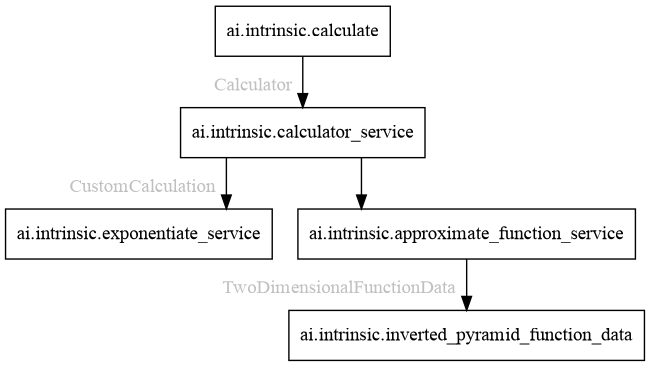
Collectively, these example Assets demonstrate the following types of Asset dependency:
- Skill -> Service: See the interaction between ai.intrinsic.calculate and ai.intrinsic.calculator_service.
- Service -> Service: See the interactions between ai.intrinsic.calculator_service and ai.intrinsic.exponentiate_service or ai.intrinsic.approximate_function_service.
- Service -> Data: See the interaction between ai.intrinsic.approximate_function_service and ai.intrinsic.inverted_pyramid_function_data.
(The platform also supports Skill -> Data dependencies. They are not illustrated here, but specifying them is analogous to specifying Service -> Data dependencies.)
All of the Assets described in this guide are available in the AssetCatalog and in the SDK for you to try out:
- ai.intrinsic.calculator_service
- ai.intrinsic.calculate
- ai.intrinsic.exponentiate_service
- ai.intrinsic.approximate_function_service
- ai.intrinsic.inverted_pyramid_function_data
Skill -> Service dependencies
We begin by considering a Skill that wants to call a gRPC service provided by a
Service. Here the Skill is ai.intrinsic.calculate, which performs a
calculation by calling a intrinsic_proto.services.Calculate gRPC service.
Declaring a dependency
The first step for the Skill developer is to declare this dependency via an
annotated field in the Skill's parameters proto; in this case it is a field
named calculator (of type ResolvedDependency):
message CalculateParams {
  intrinsic_proto.assets.v1.ResolvedDependency calculator = 1
      [(intrinsic_proto.assets.field_metadata).dependency = {
        requires: "grpc://intrinsic_proto.services.Calculator",
      }];

  ...
}
The annotation above declares that the dependency specified by the calculator
field must be satisfied by something that provides the
intrinsic_proto.services.Calculator gRPC interface.
A dependency annotation can list any number of required interfaces; a dependency can only be satisfied by an Asset that provides all of those interfaces.
Resolving the dependency
Later when a user adds the Skill to their Process and configures it, they will
see the following UI in the Solution editor to help them choose a Service
instance to provide via the calculator field:

In the image above, a single Service instance named some_calculator exists that satisfies the dependency constraint. The user can either choose that existing instance or create a new one by clicking Add new.
Using the dependency
When the Skill is executed, it uses the information provided in its parameters
to interact with its dependencies. In this case, the Skill uses information in
the calculator field to connect to the target Calculator service:
#include "intrinsic/assets/dependencies/utils.h"

char kCalculatorInterface[] = "grpc://intrinsic_proto.services.Calculator";

// Implementation of the calculate Skill's Execute method.
absl::StatusOr<std::unique_ptr<google::protobuf::Message>>
CalculateSkill::Execute(const ExecuteRequest& request,
                        ExecuteContext& context) {
  ...

  // Get the Skill's parameters.
  INTR_ASSIGN_OR_RETURN(
      auto params, request.params<intrinsic_proto::skills::CalculateParams>());

  // Connect to the Calculator service.
  ::grpc::ClientContext ctx;
  INTR_ASSIGN_OR_RETURN(std::shared_ptr<grpc::Channel> channel,
                        assets::dependencies::Connect(ctx, params.calculator(),
                                                      kCalculatorInterface));
  auto stub = intrinsic_proto::services::Calculator::NewStub(channel);

  ...
}
Providing gRPC service connection information to Skills
By default, the platform only provides Service dependency connection information
to Skills in their execute method. In all other methods such as preview,
connection information is cleared from the provided ResolvedDependency. Since
Services can interact with the real world (e.g., moving an arm, acquiring sensor
data, or querying the state of a factory management system), this restriction
protects Processes from inadvertently moving objects in the physical environment
or being corrupted by real world state during preview or other
computation-only phases.
However, there are cases when a Skill must communicate with a service even
during preview runs. For instance, a grasping Skill may need to call a grasp
planning service even while previewing its behavior. In these cases, the Skill
developer can annotate their dependency to indicate that connection information
should always be provided. In our case, we modify the calculator field as
follows:
  intrinsic_proto.assets.v1.ResolvedDependency calculator = 1
      [(intrinsic_proto.assets.field_metadata).dependency = {
        requires: "grpc://intrinsic_proto.services.Calculator",
        skill_annotations: { always_provide_connection_info: true }
      }];
The always_provide_connection_info flag should only be used when calling
the service will never lead to interaction with the real world. Otherwise,
the Process could perform incorrect or even unsafe actions during preview
runs.
Service -> Service dependencies
A Service can depend on gRPC services provided by other Services in much the same way as Skills do (described above). The only difference is that the Service specifies its dependencies in its Service config proto (compared to the Skill specifying them in its parameters proto).
In our example, ai.intrinsic.calculator_service specifies an optional
dependency on a CustomCalculation gRPC service. If specified, that service
dependency extends the calculator's functionality by adding an additional
operation for the user to choose:
message CalculatorConfig {
  ...

  optional intrinsic_proto.assets.v1.ResolvedDependency custom_calculation = 2
      [(intrinsic_proto.assets.field_metadata).dependency = {
        requires: "grpc://intrinsic_proto.services.CustomCalculation",
      }];
}
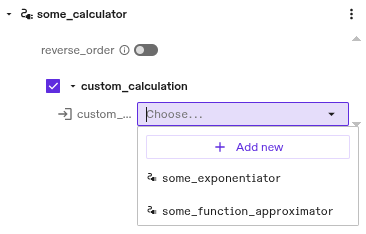
This dependency can be satisfied by either ai.intrinsic.exponentiate_service or ai.intrinsic.approximate_function_service:
Service -> Data dependencies
Similarly, a Service (or a Skill) can depend on a proto message provided by a
Data Asset. In our example, ai.intrinsic.approximate_function_service uses
TwoDimensionalFunctionData provided by a Data Asset to approximate a function:
message ApproximateFunctionConfig {
  intrinsic_proto.assets.v1.ResolvedDependency data = 2
      [(intrinsic_proto.assets.field_metadata).dependency = {
        requires: "data://intrinsic_proto.services.TwoDimensionalFunctionData",
      }];

  ...
}
The Solution editor UI similarly helps the user choose a Data Asset to provide to the Service:

The Service reads the provided data at startup:
from intrinsic.assets.dependencies import utils

def main(argv: Sequence[str]) -> None:
  # Read the Service's config.
  config = approximate_function_pb2.ApproximateFunctionConfig()
  with open("/etc/intrinsic/runtime_config.pb", "rb") as f:
    context = runtime_context_pb2.RuntimeContext.FromString(f.read())
  if not context.config.Unpack(config):
    raise RuntimeError("Failed to unpack config")

  # Retrieve the function data.
  data = None
  try:
    data_any = utils.get_data_payload(
        dep=config.data,
        iface=f"data://{two_dimensional_function_data_pb2.TwoDimensionalFunctionData.DESCRIPTOR.full_name}",
    )
  except utils.MissingInterfaceError as e:
    logging.error("No data provided to approximate function: %s", e)
  else:
    data = two_dimensional_function_data_pb2.TwoDimensionalFunctionData()
    if not data_any.Unpack(data):
      raise RuntimeError("Failed to unpack data")

  ...
Developers should not assume that dependencies have been resolved when processing their Asset's configuration. The Asset should be robust to missing information.
In the example above the Service continues with data having a None value
if the user has not (yet) provided the data for the function approximation.
Depending on object information
In terms of dependencies, HardwareDevices behave much like Services. Their Service component can provide interfaces and depend on interfaces provided by other Assets.
Additionally, HardwareDevices provide an object that can be required as an additional dependency constraint.
As an example, a Skill might call a RobotArmController service and
additionally need to know where the associated arm is in the workcell. In that
case, it could specify its dependency on the arm as follows:
message MoveArmParams {
  intrinsic_proto.assets.v1.ResolvedDependency arm = 1
      [(intrinsic_proto.assets.field_metadata).dependency = {
        requires: "grpc://intrinsic_proto.services.RobotArmController",
        requires_object: {},
      }];

  ...
}
Only a HardwareDevice can satisfy this dependency, since the annotation declares that both a service and an object are required.
During execution, the Skill could then query its ObjectWorldClient for object
information about the arm:
def execute(
      self,
      request: skill_interface.ExecuteRequest[say_skill_pb2.SayParams],
      context: skill_interface.ExecuteContext,
  ) -> None:

  arm_object_name = request.params.arm.object.name
  arm_object = context.object_world().get_object(arm_object_name)

  ...