Key value store
Intrinsic provides a protobuf based key value store. This can be used by asset builders to persist data on-premise across solution and IPC restarts. The values should not exceed 100 MiB.
The key value store (KV store) is an extended feature of the Intrinsic pubsub infrastructure.
Key format
- A key consists of one or more identifiers separated by
/ - Keys are case-sensitive
- The following characters are not allowed:
*,$,#,?cannot appear anywhere in the key/cannot appear at the start and at the end of the key- The
//sequence is not allowed
For performance reasons, it is recommended to use path components that consist of a single identifier. For example, prefer sensors/123/temperature to sensor123/temperature.
Construct keys from multiple parts
MakeKey is the helper function that constructs a key from multiple parts.
For example, MakeKey("sensors", "123", "temperature") will return sensors/123/temperature.
The following code snippets illustrate usage of this function in different languages:
C++
#include "intrinsic/platform/pubsub/kvstore.h"

std::string key = KeyValueStore::MakeKey("sensors", "123", "temperature")
Python
from intrinsic.platform.pubsub.python import pubsub

key = pubsub.KeyValueStore.MakeKey("sensors", "123", "temperature")
Go
import "intrinsic/platform/pubsub/golang/kvstore"

key := kvstore.MakeKey("sensors", "123", "temperature")
Add data to the KV store
Code examples
C++
#include "intrinsic/platform/pubsub/pubsub.h"

MyProto pb;
PubSub pubsub;  // Always keep the reference to `pubsub` alive
INTR_ASSIGN_OR_RETURN(auto kvstore, pubsub.KeyValueStore());
INTR_RETURN_IF_ERROR(kvstore.Set("message_key", pb, /*high_consistency=*/true));
Python
from intrinsic.platform.pubsub.python import pubsub

ps = pubsub.PubSub()
kvstore = ps.KeyValueStore()

value = MyProto()
# Populate the `value` here

try:
  kvstore.Set("my_key", value, high_consistency=True)
except RuntimeError as e:
  # Add error handling code here
  pass
Expectations for data consistency
The default Set call provides eventual consistency; it returns while the update is still propagating, meaning the change may not be immediately visible to other requests or clients.
For strong consistency guarantees, enable the high_consistency flag. This blocks execution until the value is confirmed persisted in the store (verifying via read-after-write). This operation has a 30-second timeout.
In the replicated KV store, the high_consistency flag blocks execution until the value
is persisted in the local replica.
Get the value of an individual key from the KV store
C++
#include "intrinsic/platform/pubsub/pubsub.h"

PubSub pubsub; // Always keep the reference to `pubsub` alive
INTR_ASSIGN_OR_RETURN(auto kvstore, pubsub.KeyValueStore());
absl::StatusOr<MyProto> msg = kvstore.Get<MyProto>("message_key");

if (msg.ok()) {
  // The value was retrieved successfully.
} else if (msg.status().code() == absl::StatusCode::kNotFound) {
  // The key was not found.
} else {
  // Something else went wrong.
}
Python
from intrinsic.platform.pubsub.python import pubsub

ps = pubsub.PubSub()
kvstore = ps.KeyValueStore()

try:
  wrapped_value = kvstore.Get("my_key")
  value = MyProto()  # An empty proto of the same type that you expect to get.
  wrapped_value.Unpack(value)
except RuntimeError as e:
  if "NOT_FOUND" in str(e):
    # The key was not found.
    pass
  else:
    # Something else went wrong.
    pass
Get the values of all keys matching a pattern from the KV store
Wildcard characters
You can construct a pattern that matches multiple keys by using the following wildcard characters:
*matches a single path component**matches any number of path components$*matches a substring of a path component
Note: Use of $* is discouraged because it is slower than *.
Examples
| Pattern | Key that matches the pattern | Key that doesn't match the pattern |
|---|---|---|
sensors/*/temperature | sensors/123/temperature | sensors/123/456/temperature |
sensors/** | sensors/123/456/temperature | sensor123/temperature |
sensor$*/temperature | sensor123/temperature | sensors/123/temperature |
Code examples
Python
from intrinsic.platform.pubsub.python import pubsub

ps = pubsub.PubSub()
kvstore = ps.KeyValueStore()

try:
  keys_and_values = kvstore.GetAllSynchronous("my_key/**")  # Wildcards allowed.
  for key, wrapped_value in keys_and_values.items():
    value = MyProto()  # An empty proto of the same type that you expect to get.
    wrapped_value.Unpack(value)
except RuntimeError as e:
  # Add error handling code here
  pass
If your pattern doesn't match any keys, GetAllSynchronous will return an
empty result set. Unlike Get, it will not throw the NOT_FOUND error.
C++ (synchronous)
The code below will block the calling thread until all values are retrieved, or the timeout expires.
#include "intrinsic/platform/pubsub/pubsub.h"

PubSub pubsub; // Always keep the reference to `pubsub` alive
INTR_ASSIGN_OR_RETURN(auto kvstore, pubsub.KeyValueStore());

INTR_ASSIGN_OR_RETURN(
  auto keys_and_values,
  kvstore.GetAllSynchronous(
    "my_key/**", // Wildcards are allowed
    absl::Seconds(10)
  ));
for (const auto& [key, wrapped_value] : keys_and_values) {
  MyProto msg; // An empty proto of the same type that you expect to get.
  wrapped_value.UnpackTo(&msg);
}
If your pattern doesn't match any keys, GetAllSynchronous will return an
empty result set. Unlike Get, it will not return the kNotFound status.
C++ (asynchronous)
The code below does not block the calling thread while key-value pairs are being retrieved. It uses callbacks to notify the calling code about the following events:
- A key-value pair has been retrieved.
- The retrieval process is complete.
Those callbacks are invoked on a different thread.
The GetAll function shown below returns the intrinsic::KVQuery object that should be
kept alive until after the retrieval process is complete.
#include "intrinsic/platform/pubsub/pubsub.h"
PubSub pubsub; // Always keep the reference to `pubsub` alive
INTR_ASSIGN_OR_RETURN(auto kvstore, pubsub.KeyValueStore());
// `value_callback` will be called for each key-value pair retrieved from
// the store.
std::function<
void(absl::string_view key,
std::unique_ptr<google::protobuf::Any> value)> value_callback =
[](absl::string_view key,
std::unique_ptr<google::protobuf::Any> wrapped_value) {
MyProto msg; // An empty proto of the same type that you expect to get.
wrapped_value.UnpackTo(&msg);
};
absl::Notification notif;
// `done_callback` will be called once when all key-value pairs are retrieved.
std::function<void(absl::string_view)> done_callback =
[¬if](absl::string_view key) {
// Notifying threads waiting for completion of the retrieval process.
notif.Notify();
};
INTR_ASSIGN_OR_RETURN(
absl::StatusOr<intrinsic::KVQuery> query,
kvstore.GetAll(
"my_key/**", // Wildcards are allowed.
value_callback,
done_callback);
);
if (notif.WaitForNotificationWithTimeout(absl::Seconds(10))) {
// Now it is safe to destroy the query.
}
If your pattern doesn't match any keys, then the value_callback will never be called, and done_callback will be called once.
Subscribe to changes in the KV store
It is possible to subscribe to changes in values whose keys match the given pattern. The subscription allows you to register the following callbacks:
- Value callback - invoked when a valid value is set for a key
- Deletion callback - invoked when a key is deleted
- Error callback - invoked when a value is set but it cannot be parsed or doesn't match the expected type
You can create multiple subscriptions for the same pattern. In this case, each subscription's callbacks will be called, but the order in which they are called is undefined.
Your code is responsible for keeping the subscription for as long as it's needed, and closing it afterwards.
Receive homogenous values from the subscription
If all keys you want to subscribe to have values of the same type, you can create a subscription as follows:
Python
from intrinsic.platform.pubsub.python import pubsub

ps = pubsub.PubSub()
kvstore = ps.KeyValueStore()

def ValueCallback(k: str, val: MyProto) -> None:
  # Process updated value here
  pass

def DeletionCallback(k) -> None:
  # Process deleted key here
  pass

def ErrorCallback(k, packet, status) -> None:
  # Process error here
  pass

# An empty proto of the same type that you expect to receive.
exemplar = MyProto()

sub = kvstore.CreateSubscription(
          "my_key/**",  # Wildcards allowed.
          pubsub.TopicConfig(),
          exemplar,
          ValueCallback,
          DeletionCallback,
          ErrorCallback,
      )

# When the subscription is no longer needed, close it:
sub.Close()
C++
#include "intrinsic/platform/pubsub/pubsub.h"

PubSub pubsub; // Always keep the reference to `pubsub` alive
INTR_ASSIGN_OR_RETURN(auto kvstore, pubsub.KeyValueStore());

std::function<void(absl::string_view k, const MyProto& val)> value_callback =
      [&](absl::string_view k, const MyProto& val) {
        // Process updated value here.
      };

std::function<void(absl::string_view k)> del_callback =
    [&](absl::string_view k) {
      // Process deleted key here.
     };

std::function<void(absl::string_view k, absl::string_view packet,
                   absl::Status status)>
    error_callback = [&](absl::string_view k, absl::string_view packet,
                         absl::Status status) {
      // Process error here.
    };

// An empty proto of the same type that you expect to receive.
MyProto exemplar;

ASSERT_OK_AND_ASSIGN(
    intrinsic::Subscription sub,
    kvstore.CreateSubscription(
      "my_key/**",  // Wildcards allowed.
      intrinsic::TopicConfig(),
      exemplar,
      value_callback,
      del_callback,
      error_callback));

// When the subscription is no longer needed, close it:
sub.Unsubscribe();
Receive heterogenous values from the subscription
If keys you're planning to subscribe to have values of different types, you can
create a subscription as shown in examples below. The value callback will
receive Any protos. The callback is responsible for extracting values from
those protos and checking their type.
Python
from intrinsic.platform.pubsub.python import pubsub
from google.protobuf.any_pb2 import Any

ps = pubsub.PubSub()
kvstore = ps.KeyValueStore()

def ValueCallback(k: str, wrapped_value: Any) -> None:
  value_type_url = wrapped_value.type_url

  if value_type_url == "type.googleapis.com/my_package.MyProto":
    val = MyProto()
    wrapped_value.Unpack(val)
    # Process unwrapped value here.


def DeletionCallback(k) -> None:
  # Process deleted key here.
  pass


sub = kvstore.CreateSubscription(
          "my_key/**",  # Wildcards allowed.
          pubsub.TopicConfig(),
          ValueCallback,
          DeletionCallback,
      )

# When the subscription is no longer needed, close it:
sub.Close()
C++
#include "intrinsic/platform/pubsub/pubsub.h"

PubSub pubsub; // Always keep the reference to `pubsub` alive
INTR_ASSIGN_OR_RETURN(auto kvstore, pubsub.KeyValueStore());

std::function<void(absl::string_view k,
                   const google::protobuf::Any& wrapped_value)>
  value_callback =
      [&](absl::string_view k, const google::protobuf::Any& wrapped_value) {
          const std::string& value_type = wrapped_value.type_url();
          if (value_type == "type.googleapis.com/my_package.MyProto") {
            MyProto val;
            wrapped_value.UnpackTo(&val);
            // Process unwrapped value here.
          }
      };

std::function<void(absl::string_view k)> del_callback =
    [&](absl::string_view k) {
      // Process deleted key here.
    };

ASSERT_OK_AND_ASSIGN(
    intrinsic::Subscription sub,
    kvstore.CreateSubscription(
      "my_key/**",  // Wildcards allowed.
      intrinsic::TopicConfig(),
      value_callback,
      del_callback));

// When the subscription is no longer needed, close it:
sub.Unsubscribe();
Delete data from the KV store
It is possible to delete individual keys, or perform bulk deletion of all keys that match a pattern. If the given key does not exist, the delete operation is a no-op.
Python
from intrinsic.platform.pubsub.python import pubsub

ps = pubsub.PubSub()
kvstore = ps.KeyValueStore()

try:
  kvstore.Delete("my_key/**")  # Wildcards allowed.
except RuntimeError as e:
  # Add error handling code here
  pass
C++
#include "intrinsic/platform/pubsub/pubsub.h"

PubSub pubsub; // Always keep the reference to `pubsub` alive
INTR_ASSIGN_OR_RETURN(auto kvstore, pubsub.KeyValueStore());
INTR_RETURN_IF_ERROR(kvstore.Delete("my_key/**")); // Wildcards are allowed.
Persistent characteristics
Initial and end states
-
When you lease a VM, its KV store is always empty.
-
When you return the VM or when it expires, the data in the KV store is cleared.
-
In a new IPC, its KV store is always empty.
Cases where the data is persistent
The data in the KV store is persistent and unchanged across:
- Redeploying a solution, or deploying a new one on the same IPC or VM.
- Restarts of the IPC.
Replicate Key-value pairs
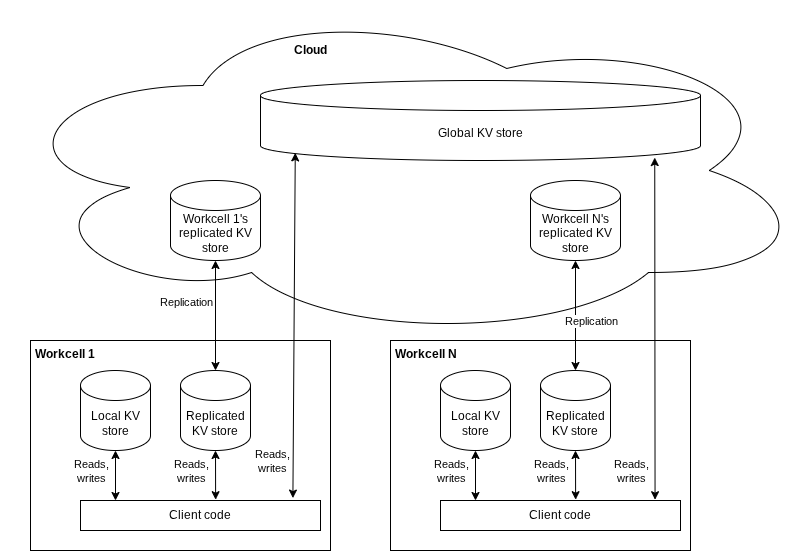
Key-value pairs stored in the KV store can be replicated to the cloud. Application developers can use this capability to achieve the following goals:
- Back up data stored in a workcell's KV store to the cloud
- Move data in one workcell's KV store to another workcell's KV store
- Store validated key value pairs (e.g. from a VM) in the global KV store for later use
Examples of use cases enabled by replication
Back up data stored in a workcell's KV store to the cloud
Key-value pairs in the replicated KV store are preserved, even if data stored on a workcell's local disk is lost (for example, because of a disk failure). When a workcell restarts after such failure and reconnects to the cloud, key-value pairs are copied from the cloud to the workcell's local disk.
To perform the backup, do the following:
- Access replicated KV store
- Read individual keys
or all keys matching a certain pattern
from the workcell's local KV store, and copy their values to the replicated
KV store.
- Note, however, that you cannot use the same keys in the replicated KV store. For each key you read from the local KV store, you'll need to construct a new key in the workcell's namespace in the replicated KV store
- Each key-value pair stored in the replicated KV store will eventually be replicated to the cloud
Copy data from one workcell's KV store to another workcell's KV store
Key-value pairs stored in one workcell's (or VM's) replicated KV store can be copied to another workcell. This is useful in scenarios when you prepare a job in a simulation, and want to copy its configuration to a real workcell.
To make a copy, do the following:
- Access replicated KV store
- Call the
AdminCloudCopyAPI for each key you want to copy.
Store validated key value pairs in the global KV store for later use
Key-value pairs in the global KV store are stored indefinitely. This is useful in scenarios when you prepare a job in a simulation, and want to save its configuration for later use. Once key-value pairs are stored in the global KV store, it is possible to safely delete the VM where you ran the simulation.
To put data into the global KV store, do the following:
- Access replicated KV store
- Put key-value pairs into the global KV store.
- Once key-value pairs are written to the global KV store, they can be read from any VM or a cloud connected workcell belonging to the same organization.
Lifecycle of replicated KV stores
- Workcell's replicated KV store exists for as long as the workcell exists.
- When a workcell or VM is deleted, the cloud replica of its KV store is also deleted. All data stored in the replicated KV store is lost.
- Global KV store exists for as long as the organization exists.
Access replicated KV store
Intrinsic client libraries provide the following APIs for accessing the replicated KV store:
C++
#include "intrinsic/platform/pubsub/pubsub.h"
#include "intrinsic/platform/pubsub/kvstore.h"

PubSub pubsub;  // Always keep the reference to `pubsub` alive
INTR_ASSIGN_OR_RETURN(
  auto kvstore,
  pubsub.KeyValueStore(::intrinsic::kReplicationPrefix));
Python
from intrinsic.platform.pubsub.python import pubsub

ps = pubsub.PubSub()
kvstore = ps.ReplicationKeyValueStore()
Go
import (
 "intrinsic/platform/pubsub/golang/kvstore"
 "intrinsic/platform/pubsub/golang/pubsub"
)

ps, err := pubsub.NewPubSub()
if err != nil {
 // Handle error here
}
kv := ps.KVStoreReplicated()
Construct keys
Keys in workcell's replicated KV store
Key-value pairs will be replicated to the cloud if their keys start with
WORKCELL_NAMESPACE/YOUR_ORG_NAMESPACE/
Where:
WORKCELL_NAMESPACEis the workcell's private namespace in the replicated KV store. You can obtain it by calling the API described below.YOUR_ORG_NAMESPACEis the identifier of your own choosing.intrinsicandai.intrinsicare reserved for Intrinsic's internal use.
Those key-value pairs are stored on the workcell's local disk and in the cloud.
Obtain workcell's namespace and add it to a key
Call the following API to obtain workcell's namespace in the replicated KV store. Note that the namespace may not be available immediately. In this case, the API will return an error. If the error indicates that the namespace is not available yet, consider retrying.
C++
#include "absl/status/status.h"
#include "intrinsic/platform/pubsub/kvstore.h"

constexpr absl::string_view kOrgNamespace = "com.example";

absl::StatusOr<std::string> replication_namespace =
        kvstore.GetWorkcellReplicationNamespace();

if (replication_namespace.ok()) {
  // The namespace has been obtained, it's safe to proceed.
  // Constructing the key that can be used with the replicated KV store.
  std::string key = KeyValueStore::MakeKey(
    *replication_namespace, kOrgNamespace, "my_key")
} else if (replication_namespace.status().code() ==
            absl::StatusCode::kDeadlineExceeded) {
  // The request to obtain the namespace timed out.
  // Consider retrying.
} else {
  // An unexpected error occurred.
  // The replicated KV store cannot be used.
}
Python
from intrinsic.platform.pubsub.python import pubsub

_ORG_NAMESPACE = "com.example"

try:
  namespace = kvstore.GetWorkcellReplicationNamespace()

  # The namespace has been obtained, it's safe to proceed.
  # Constructing the key that can be used with the replicated KV store.
  key = pubsub.KeyValueStore.MakeKey(namespace, _ORG_NAMESPACE, "my_key")
except RuntimeError as e:
  if "DEADLINE_EXCEEDED" in str(e):
    # The request to obtain the namespace timed out.
    # Consider retrying.
    pass
  else:
    # An unexpected error occurred.
    # The replicated KV store cannot be used.
    pass
Go
import "intrinsic/platform/pubsub/golang/kvstore"

const orgNamespace = "com.example"

ns, err := kv.GetWorkcellReplicationNamespace()
if err == nil {
  // The namespace has been obtained, it's safe to proceed.
  // Constructing the key that can be used with the replicated KV store.
  key := kvstore.MakeKey(ns, orgNamespace, "my_key")
} else if errors.Is(err, kvstore.ErrNotFound) {
  // The namespace is not available yet.
  // Consider retrying.
} else {
  // An unexpected error occurred.
  // The replicated KV store cannot be used.
}
Keys in the global KV store
Key-value pairs will be stored in the global KV store if their keys start with
global/YOUR_ORG_NAMESPACE/
Where:
YOUR_ORG_NAMESPACEis the identifier of your own choosing.intrinsicandai.intrinsicare reserved for Intrinsic's internal use.
Those key-value pairs are stored only in the cloud. All VMs and cloud connected workcell within an organization can access them.
Construct a key that can be used with the global KV store
The following code snippets show how to use the MakeKey function to construct
keys that can be used with the global KV store:
C++
#include "intrinsic/platform/pubsub/kvstore.h"

constexpr absl::string_view kOrgNamespace = "com.example";

std::string key = KeyValueStore::MakeKey("global", kOrgNamespace, "my_key")
Python
from intrinsic.platform.pubsub.python import pubsub

_ORG_NAMESPACE = "com.example"

key = pubsub.KeyValueStore.MakeKey("global", _ORG_NAMESPACE, "my_key")
Go
import "intrinsic/platform/pubsub/golang/kvstore"

const orgNamespace = "com.example"

key := kvstore.MakeKey("global", orgNamespace, "my_key")
Copy data from one workcell's KV store to another workcell's KV store
The AdminCloudCopy function copies key-value pairs from one workcell's
replicated KV store to other workcell's replicated KV store.
AdminCloudCopy will fail if the workcell is not connected to the cloud.
The following code snippets show how AdminCloudCopy can be used in different
languages:
C++
#include "intrinsic/platform/pubsub/pubsub.h"
#include "intrinsic/platform/pubsub/kvstore.h"

constexpr absl::string_view kOrgNamespace = "com.example";

PubSub pubsub;  // Always keep the reference to `pubsub` alive
INTR_ASSIGN_OR_RETURN(
  auto kvstore,
  pubsub.KeyValueStore(::intrinsic::kReplicationPrefix));

absl::StatusOr<std::string> this_workcell_replication_namespace =
  kvstore.GetWorkcellReplicationNamespace();

// Error handling code omitted.

std::string other_workcell_replication_namespace = "node-123-456-789";

std::string source_key = ::intrinsic::KeyValueStore::MakeKey(
  this_workcell_replication_namespace, kOrgNamespace, "my_key");
std::string target_key = ::intrinsic::KeyValueStore::MakeKey(
  other_workcell_replication_namespace, kOrgNamespace, "my_key");

absl::Status copy_succeeded = kvstore.AdminCloudCopy(
  source_key, target_key, absl::Seconds(10));

// Error handling code omitted.
Python
from intrinsic.platform.pubsub.python import pubsub

_ORG_NAMESPACE = "com.example"

pubsub_instance = pubsub.PubSub()
kvstore_repl = pubsub_instance.ReplicationKeyValueStore()

try:
  this_workcell_replication_namespace = kvstore.GetWorkcellReplicationNamespace()
except Exception as e:
  # Error handling code omitted.
  pass

other_workcell_replication_namespace = "node-123-456-789"

source_key = pubsub.KeyValueStore.MakeKey(
  this_workcell_replication_namespace,
  _ORG_NAMESPACE,
  "my_key"
)
target_key = pubsub.KeyValueStore.MakeKey(
  other_workcell_replication_namespace,
  _ORG_NAMESPACE,
  "my_key"
)

try:
  kvstore_repl.AdminCloudCopy(source_key, target_key, timeout=10)
except Exception as e:
  # Error handling code omitted
  pass
Expectations for data consistency
Replication between workcell and cloud KV stores is eventually consistent. An application writing to a KV store cannot make any assumptions about when a write will propagate to other replicas, or when the consistent state will be reached.
The high_consistency flag mentioned above blocks execution of Set calls until
the value is persisted in the local replica. When the Set call returns, the
application cannot assume that the value has been propagated to all replicas.
Performance considerations
Replication is asynchronous, so it doesn't affect latency of Get and Set operations.
See also
point_storageis an example of a service that uses KV store. It is implemented in Python.